
AQA ASCII Art
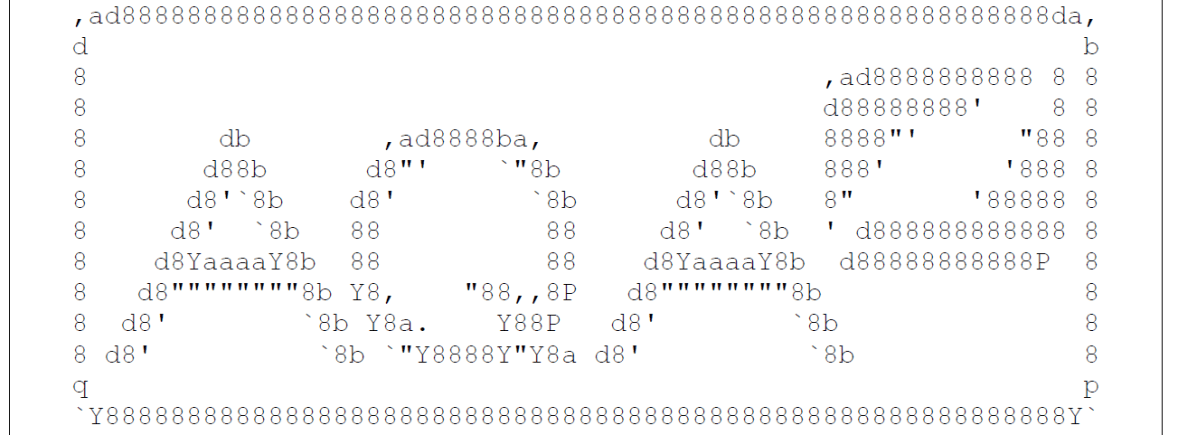
ASCII art is a technique that uses multiple lines consisting of the 95 printable characters defined by the ASCII character set to create a graphical image. Figure 1 shows an example of an ASCII art image.
The aim of compression is to reduce the number of bits needed to represent data. Reducing the number of bits used means that the data will take up less storage space and be quicker to transfer.
Run length encoding (RLE) is a simple method of compressing data that specifies the number of consecutive occurrences of a data item followed by the value of the data item.
Figure 2 shows an example of how a line from an ASCII art image can be compressed using RLE.
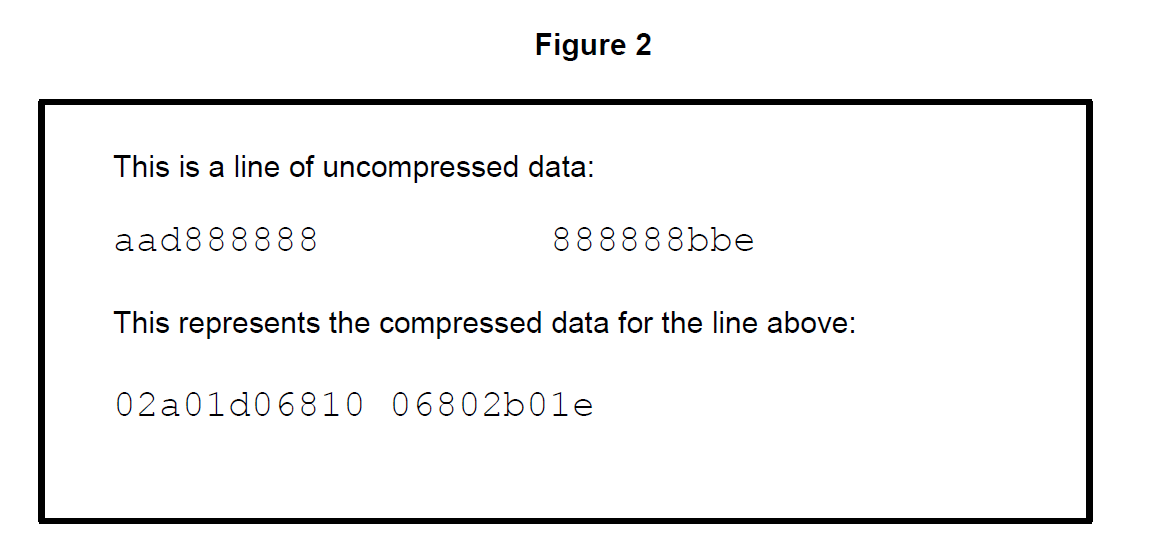
Each set of three characters in the compressed data consists of a two-digit number representing the number of consecutive occurrences of a character in the ASCII art image followed by the character itself.
The line of uncompressed data in Figure 2 is 28 characters in length, including the space characters, and the compressed data is 21 characters in length; this gives a saving of 7 characters.
Introduction to the programming project:
A program needs to be created that can compress ASCII art using RLE and decompress ASCII art that has been compressed using RLE.
Two text files have been provided that you may choose to use when testing your program:
LogoArt.txt contains the ASCII art image shown in Figure 1
LogoRLE.txt contains the compressed version of the ASCII art image shown in Figure 1.
When completing this programming project, you should always use two digits to represent the length of a run, even if the run could be represented using just one digit. You may assume that two digits will always be enough to represent the length of a run.
The program should work in the following way:
1 A menu is displayed allowing the user to select from the following options:
Enter RLE
Display ASCII art
Convert to ASCII art
Convert to RLE
Quit.
2 If the user selects the ‘Quit’ option then a suitable message should be displayed and the program ends.
3 If the user selects the ‘Enter RLE’ option:
a. the user is asked how many lines of RLE compressed data they want to enter
b. the program should check that the number entered is greater than 2 and if it isn’t display a suitable error message and get the user to keep re-entering the number until it is valid
c. if the user entered a valid number, they then enter the compressed data one line at a time until they have entered the specified number of lines
d. once all the compressed data has been entered, the program decompresses the data and displays the ASCII art image
e. the user is returned to the main menu.
4 If the user selects the ‘Display ASCII art’ option:
a. the user is asked to enter the name of the text file that contains the ASCII art
b. the program reads the contents of the text file and displays the ASCII art image
c. the user is returned to the main menu.
5 If the user selects the ‘Convert to ASCII art’ option:
a. the user is asked to enter the name of the text file that contains the RLE compressed data
b. the program reads the contents of the text file, decompresses the data and displays the ASCII art image
c. the user is returned to the main menu.
6 If the user selects the ‘Convert to RLE’ option:
a. the user is asked to enter the name of the text file that contains the ASCII art
b. the program reads the contents of the text file, compresses each line and stores the compressed data in a new text file
c. the program calculates the difference between the number of characters used in the compressed and uncompressed versions of the ASCII art and displays this value
d. the user is returned to the main menu.
END OF PROGRAMMING PROJECT TASK

